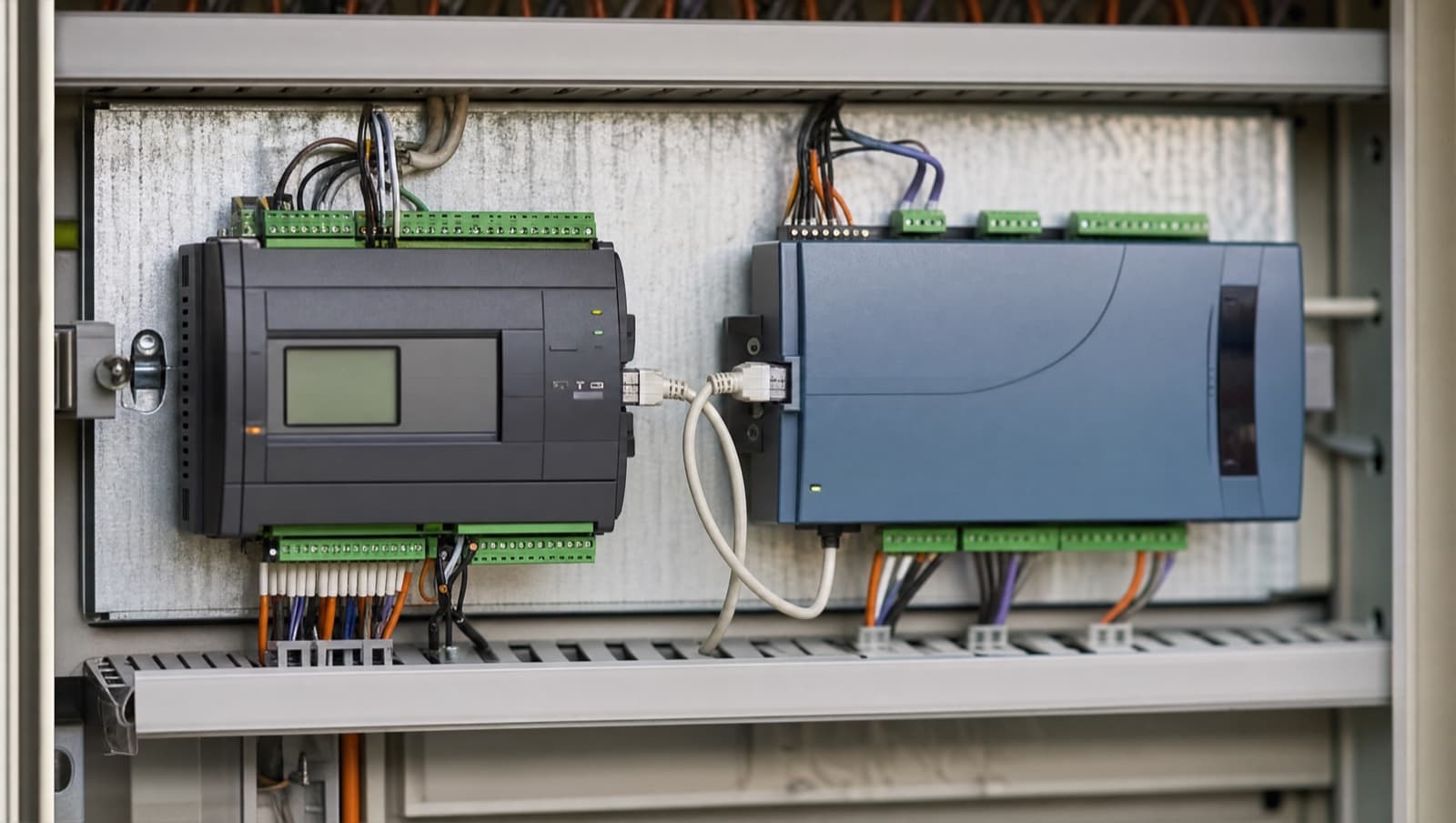

Inputs read building conditions — temperature, pressure, humidity, occupancy, plant status — while outputs drive actuators, relays and drive speed references. On Trend's IQ4NC and IQ ECO 412, every I/O point must be configured in Trend Tool to match the physical signal type wired to it, or control logic, however well written, fails. For the vendor-neutral side of this topic — what a points list is and how to read an I/O schedule as a document — see our points list and I/O schedule guide, and for the devices that land on those channels, our BMS field devices and field equipment list.
What is the difference between an input and an output on a BMS controller?
Every BMS field controller has two fundamental interfaces with the physical building: inputs, which read conditions, and outputs, which control equipment. Inputs measure temperature, pressure, humidity, occupancy, and plant status. Outputs drive actuators, switch relays, and send speed reference signals to variable speed drives. The quality of the BMS depends entirely on whether the signals arriving at those inputs are accurate and whether the signals leaving those outputs are having the intended effect on the plant. Control logic, however well written, cannot compensate for incorrectly configured or incorrectly wired I/O.
I/O misconfiguration is one of the most common sources of commissioning problems on BMS installations, and it's disproportionately common on inherited systems where nobody can say with certainty what the original settings were. A facilities manager once called to say the fourth floor of a ten-floor commercial office was freezing and the FCU valves wouldn't respond to setpoint changes — cooling demand at 0%, room temperature at 17°C, chilled water valve appearing fully closed. The cause: the valve actuator ran on a 2–10V control signal, but the controller's analogue output was configured for 0–10V. At 0% demand the controller sent 0V — below the actuator's minimum operating voltage — so the valve sat at roughly 15% open regardless of what the controller commanded. Three floors of overcooling, traced to two digits in the point configuration.

How many inputs and outputs do the Trend IQ4NC and IQ ECO 412 have?
The Trend IQ4NC is a mid-range programmable controller used extensively in commercial BMS installations across the UK. It provides eight digital inputs, eight universal inputs, eight digital outputs, and four analogue outputs, with expansion modules available for higher point counts. The IQ ECO 412 is a smaller controller typically used for single-zone FCU applications, providing four digital inputs, six universal inputs, two digital outputs, and two analogue outputs. Both run on Trend Tool and share the same I/O configuration logic — understanding one means understanding both.
What does a digital input do on a BMS controller?
Digital inputs read binary states — a pump is running or it isn't, a pressure switch has tripped or it hasn't, a smoke detector has activated or it hasn't. They detect whether a volt-free contact is open or closed. Both the IQ4NC and IQ ECO 412 accept volt-free contacts and low-voltage signal inputs on their digital inputs, making them compatible with auxiliary contacts from motor starters, alarm contacts from plant protection devices, and signal outputs from occupancy sensors and PIRs.
The normally-open versus normally-closed convention is critical for fault monitoring. A fault monitoring input wired normally-closed — current flowing when the plant is healthy — provides circuit integrity monitoring. If the wiring breaks, the controller sees the same condition as a plant trip. A fault monitoring input wired normally-open provides no such protection: a broken wire looks identical to a healthy, running plant. Fail-safe wiring should be verified on any system you inherit. In practice, mixed conventions on the same site are common and are a reliable source of spurious or missed alarms that nobody can explain without going back to the original wiring. For guidance on the correct device for proving plant operation — whether a current transformer or a current switch — see our article on current transformers vs current switches in BMS systems.
Get a Free BMS Survey
We'll assess your controls and provide a detailed quotation with energy savings estimates.
What is a universal input and why does the signal type matter?
Universal inputs handle the variable measurements that make up most of the BMS sensing picture: duct temperatures, differential pressure across filters, CO₂ levels in return air, humidity, flow rates, and pressure in hydraulic circuits. Both the IQ4NC and IQ ECO 412 support multiple signal types on their universal inputs — 0–10V and 4–20mA for active transmitters, and PT1000 and NTC10K resistance inputs for passive temperature sensors. Every universal input must be configured in Trend Tool to match the physical signal type of the sensor connected to it. The IEC 61000-4 series of EMC standards underpins the requirement to screen analogue signal cables and segregate them from power wiring — a 0–10V analogue input cable run adjacent to a 230V power cable without screening is a reliable source of erratic readings, where interference induced on the signal wire appears as a fluctuating input value that can be mistaken for a faulty sensor.
The consequences of a mismatch are rarely obvious at a glance. A PT1000 temperature sensor wired to an input configured as 0–10V will produce a reading that changes as conditions change — it will look like temperature data — but the values will be completely wrong. This kind of error produces persistent control instability that can take a long time to diagnose if the engineer assumes the I/O configuration is correct. A 4–20mA pressure transducer wired to an input configured for 0–10V will also produce a reading, but the scaling will be incorrect. On any system that has been worked on by multiple engineers over several years, checking every universal input against its physical sensor type before drawing conclusions about control performance is essential.
Can a BMS digital output switch a motor contactor directly?
Digital outputs provide on/off control — starting and stopping pumps, commanding open/close valves, enabling heating stages, or signalling an external device to run. On the IQ4NC and IQ ECO 412, digital outputs are relay contacts rated for pilot duty switching. They are designed to switch control circuit loads: small solenoid coils, intermediate relay coils, signal inputs on drives. They are not designed to switch motor contactor coils directly on anything other than the smallest motors. Wiring a digital output directly to a motor contactor without an intermediate relay risks controller damage from the inductive voltage spike when the contactor releases. BS 7671:2018 requires that the circuit design — cable size, protection device, load characteristics — is appropriate for the connected load; connecting an output relay directly to a motor contactor coil without intermediate relay protection typically violates the controller's own installation guide and risks both equipment damage and a BS 7671 non-compliance. For detailed wiring guidance on Trend BMS digital outputs and common installation pitfalls, see our article on BMS wiring, run/fault, and HOA on Trend systems.
On sites where digital outputs are wired directly to motor contactors — which happens more often than it should — the usual result is premature relay failure inside the controller. The first sign is typically an output that reads as commanded in the BMS software but isn't switching reliably in the field. The correct fix is an intermediate 24V relay with built-in suppression, inserted between the controller output and the contactor coil. This is a standard panel design requirement that should be specified at the outset rather than retrofitted after a controller output fails.
What is the 2–10V analogue output problem and how do you fix it?
Analogue outputs provide the variable signals that position actuators between fully open and fully closed — chilled water and heating valve actuators on FCUs and AHUs, variable air volume damper actuators, and speed references for variable speed drives. Both the IQ4NC and IQ ECO 412 provide 0–10V analogue outputs. In Trend Tool, the controller maps its demand value (typically 0–100%) to the voltage range.
The 2–10V configuration error is the most common analogue output problem on commercial BMS systems. Certain actuators — including specific product lines from Belimo, Siemens, and Honeywell — operate on a 2–10V range rather than 0–10V. At 0% demand, a controller outputting 0V sends the actuator below its electrical minimum, and the actuator interprets this as a calibration reference or defaults to a safe position — typically partially open. Correcting it requires adjusting the output scaling in Trend Tool so that 0% demand maps to 2V and 100% demand maps to 10V. Identifying which actuators on a site use 2–10V versus 0–10V requires checking the actuator datasheets. The specification is on the product label, but it's easy to overlook if the installing electrician was given hardware that differs from what the original design specified. For a worked example of analogue output wiring in a VAV application using Belimo actuators, see our guide to integrating Belimo VAV actuators with Trend IQ412 controllers.
What are the most common BMS I/O configuration mistakes?
The most common I/O problems are: universal inputs configured for the wrong sensor type; digital inputs with normally-open wiring on fault-monitoring points where normally-closed is required; analogue outputs with default 0–10V scaling driving actuators that need 2–10V; digital outputs driving loads outside their relay contact rating; and I/O points that are wired but unconfigured in Trend Tool, meaning the controller has no awareness of what's connected.
Inherited systems accumulate these problems over time. A controller installed fifteen years ago may have had sensors added during a refurbishment that were never properly configured in the software. A valve actuator replaced three years ago may have been substituted with a different model with a different signal requirement. An output relay that failed may have been replaced with a relay of a different type that behaves differently under load. None of these changes may have been recorded anywhere. An I/O audit — checking every point against its physical installation — is the only reliable way to establish a true baseline on an inherited system before any control improvements are attempted.
How do you plan I/O for an FCU or AHU on a Trend controller?
For a four-pipe FCU zone in a commercial office, a standard I/O assignment uses one universal input for room temperature, one universal input for supply air temperature, one digital input for occupancy or HOA switch position, one analogue output for the heating valve, one analogue output for the cooling valve, and one or two digital outputs for fan speed stages. This fits within the IQ ECO 412's point count for a single-zone application. Adding CO₂ monitoring, humidity sensing, or actuator position feedback adds input requirements and may push a complex zone toward the IQ4NC.
AHU control uses significantly more I/O. A medium-complexity strategy — two fans with run-status and fault monitoring, heating and cooling coil valves, heat recovery, fresh air and recirculation dampers — typically requires twelve to sixteen universal inputs, four to six analogue outputs, and eight to ten digital points. This exceeds the IQ4NC's base point count and usually requires expansion modules. Planning the I/O schedule before hardware is ordered avoids late changes when the controller arrives on site and the point count doesn't match the strategy.
When should you review a BMS I/O configuration?
An I/O configuration review is warranted when you're taking over a system you didn't commission, when you have unexplained control instability that the logic alone doesn't account for, when sensors or actuators are replaced with different models, when new plant is added and connected to existing controllers, and when a system has had multiple engineers work on it with no single point of documentation ownership.
For new installations, point-by-point I/O verification before and after commissioning is standard practice. Each input should be tested against a known stimulus — shorting a digital input contact, applying a measured resistance to a temperature input, applying a test voltage to an analogue input — and the reading in Trend Tool confirmed against the expected value. Each output should be exercised and the physical response observed at the plant. This takes time, but it catches configuration errors before they become operational problems in a live building.
Alpha Controls commissions and maintains BMS systems using Trend IQ4NC and IQ ECO 412 controllers across commercial buildings in London and the South East. If you're planning a new installation, troubleshooting an inherited system, or need an I/O audit before a control improvement programme, get in touch or request a quote to discuss your project.
Alpha Controls Team
Specialist BMS installation, commissioning, and maintenance across London and the South East. SafeContractor Approved, BCIA Member.